

Guided capture. Clear results.
A plan to take home.
A few minutes in front of the camera, then the software does the rest. Below: real screens from Idiag Checkup, from the 3D scan to the training plan, and everything about installation, license and data.
3D scan with automatic spine line
The 3D camera records the surface shape of the back, no photo. Within seconds the software finds the spine line on its own.
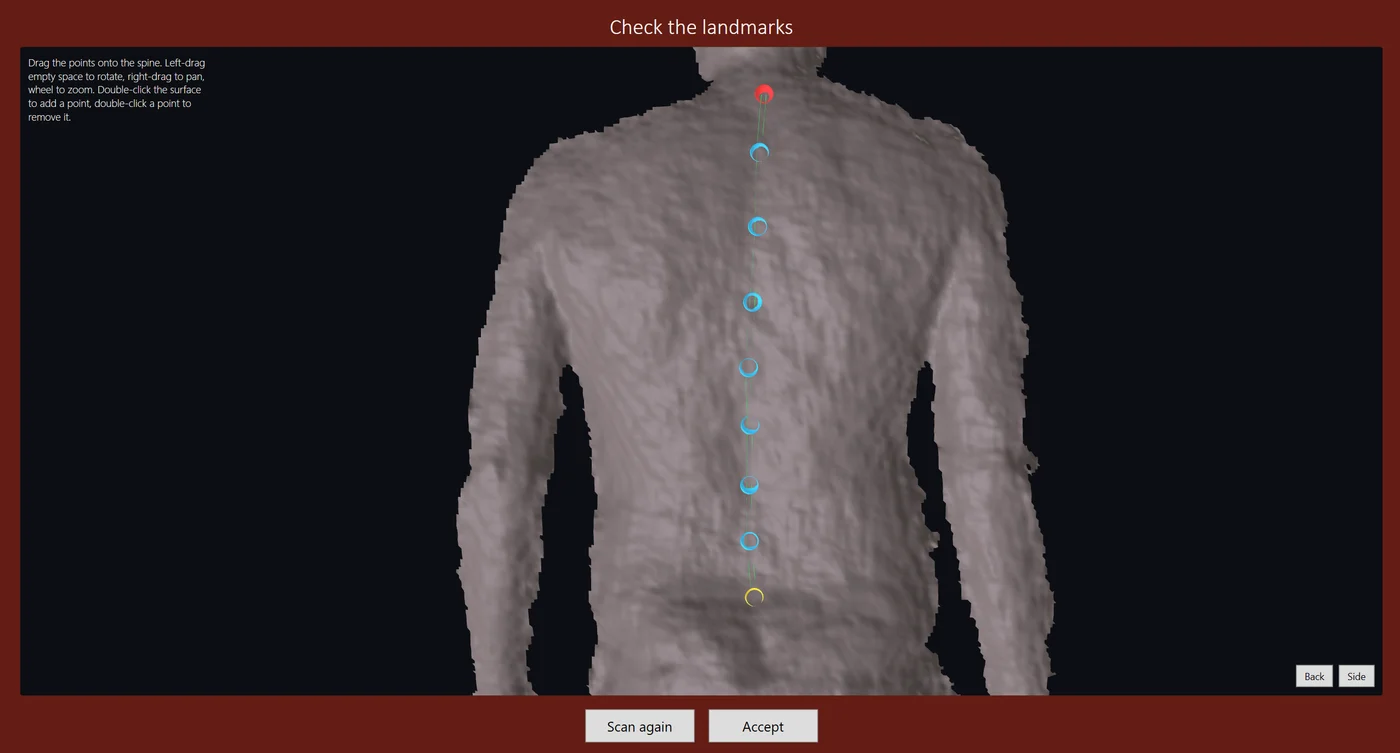
- Start point at the base of the neck, end point above the pelvis, measuring points along the spine in between.
- The line follows the actual shape of the back, also when it is not straight.
- The trainer checks the line and moves a point with the mouse if needed. A clean scan matters more than a perfect automatic point.
- The same scan is repeated for each position: upright, bending forward and, in the Complete Check, bending backward and sideways.
Three scores from 0 to 100
The result in one look, easy to explain and easy to beat at the re-check.
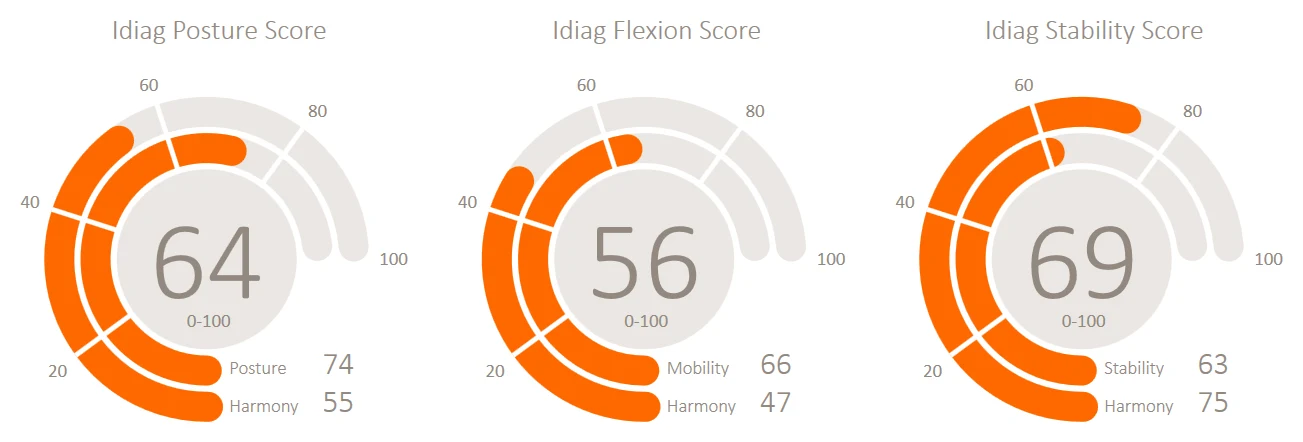
Idiag Posture Score
The upright posture of the back, compared with reference values.
Idiag Flexion Score
How well the back moves when bending forward.
Idiag Stability Score
How well the back keeps its posture under load, with the arms held out in front (Matthiass test).
Each score combines two parts, shown below the ring: the value itself and the harmony of the spine curve.
Posture in side view
The spine in side view for each position, with the curve of the upper back, the lower back and the pelvis in degrees.
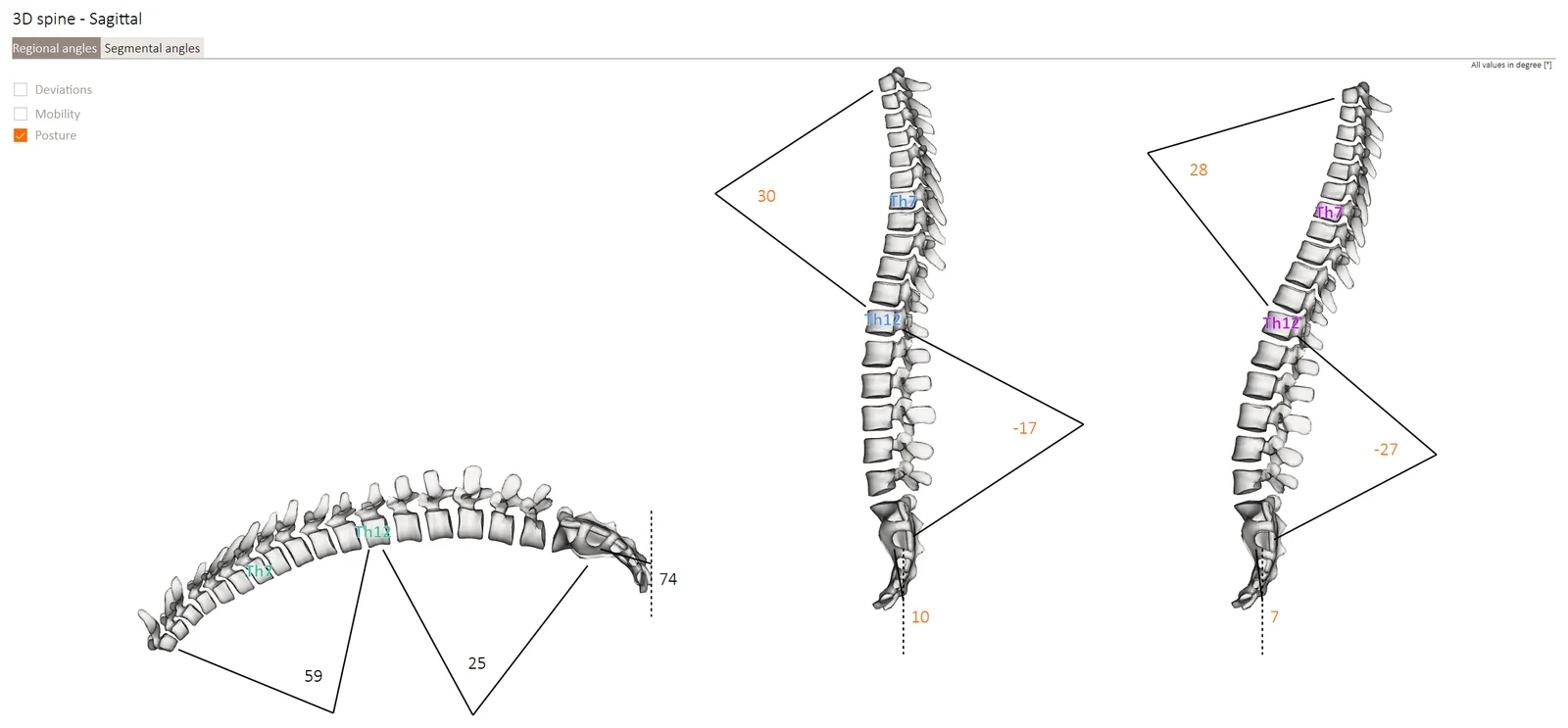
- Bent forward, upright and with the arms held forward, side by side.
- Each curve against the reference range: what is within, what deviates.
- The detailed analysis puts it in plain words, for example "flat thoracic spine" or "pelvic tilt to the back".
- Regional angles for the big picture, segmental angles vertebra by vertebra.
Mobility, section by section
How much the upper back, the lower back and the pelvis move from upright to bending forward, and how they react when the arms are held forward.
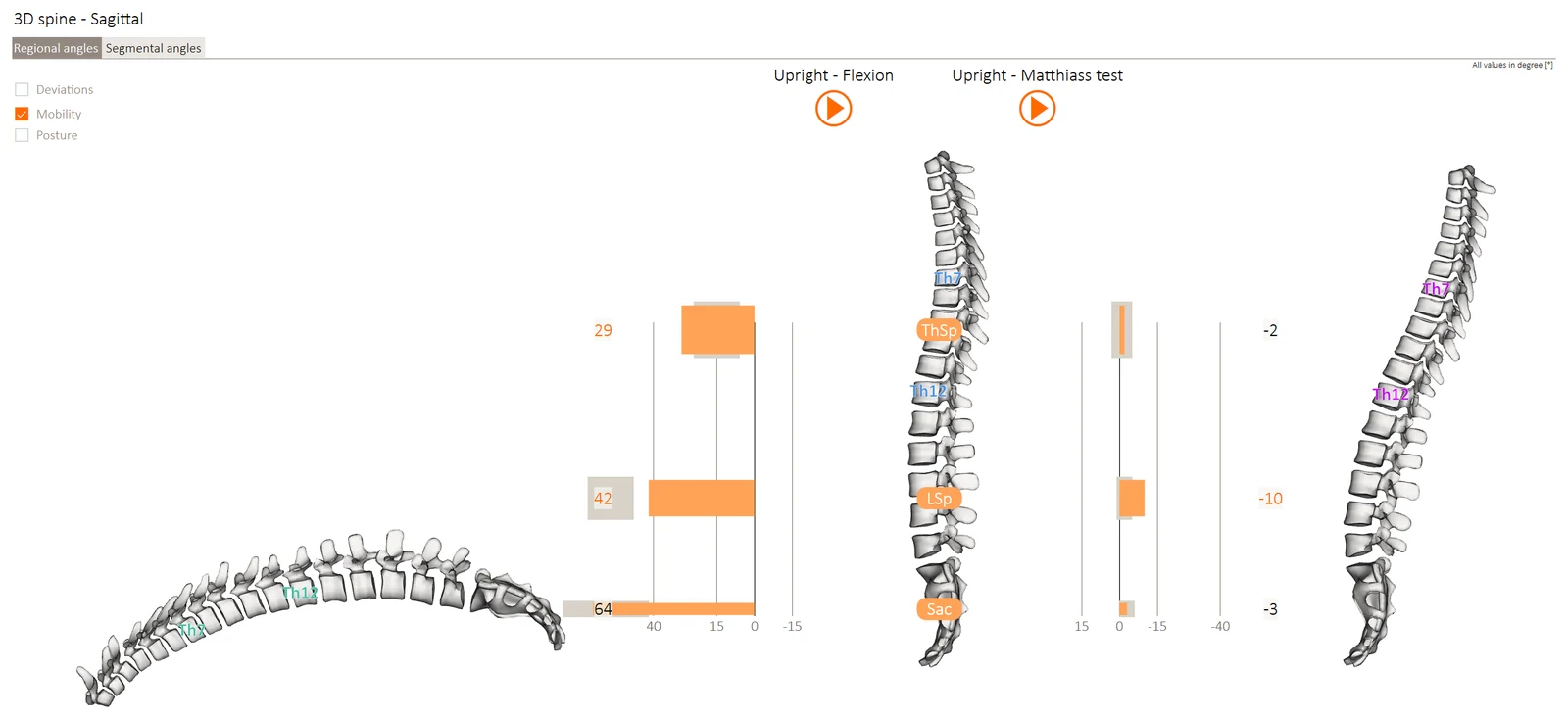
- Orange bars for the member, grey for the reference range.
- Upright to bending forward: where the movement comes from, upper back, lower back or pelvis.
- Upright to the arms held forward: how much the posture gives way under load.
- Play the movement as an animation, a good moment to explain the result.
Training planner
From the result the software suggests a training plan. The trainer adjusts it in a few clicks.
- Add, remove or reorder exercises; set sets, repetitions or duration.
- Exercises for mobility and strength, with drawn illustrations.
- Catalogues for gym machines, free weights or no equipment; the Technogym catalogue as an add-on.
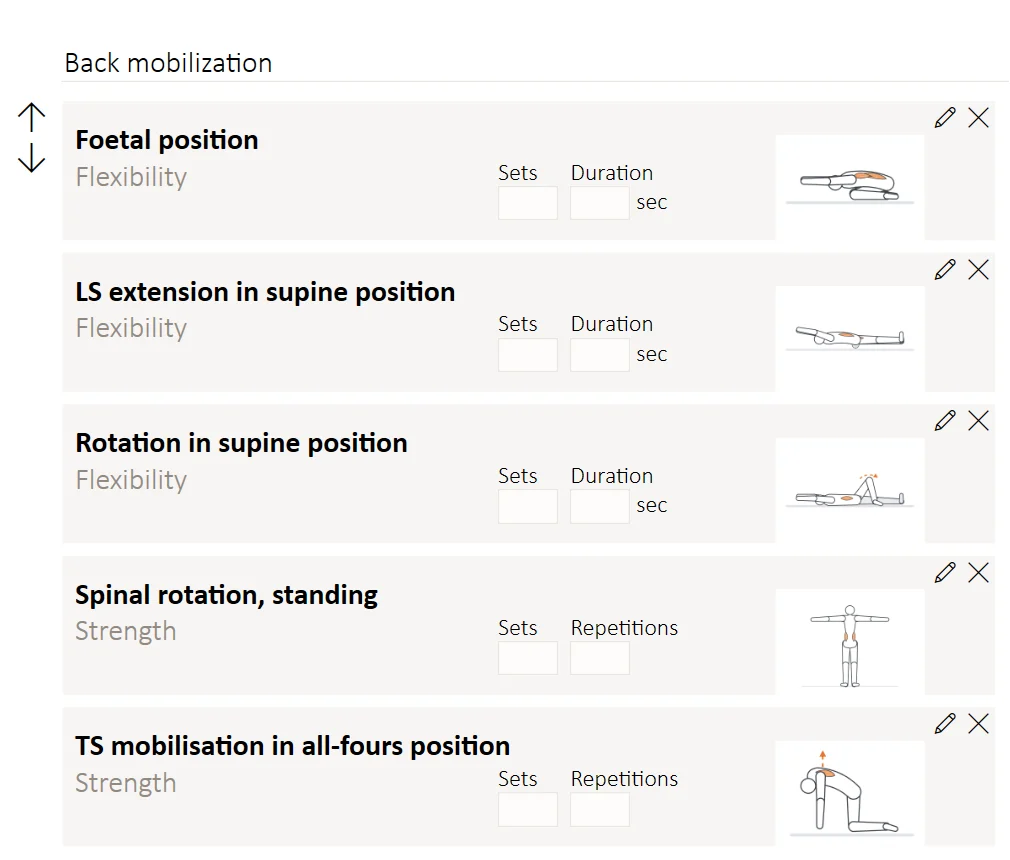
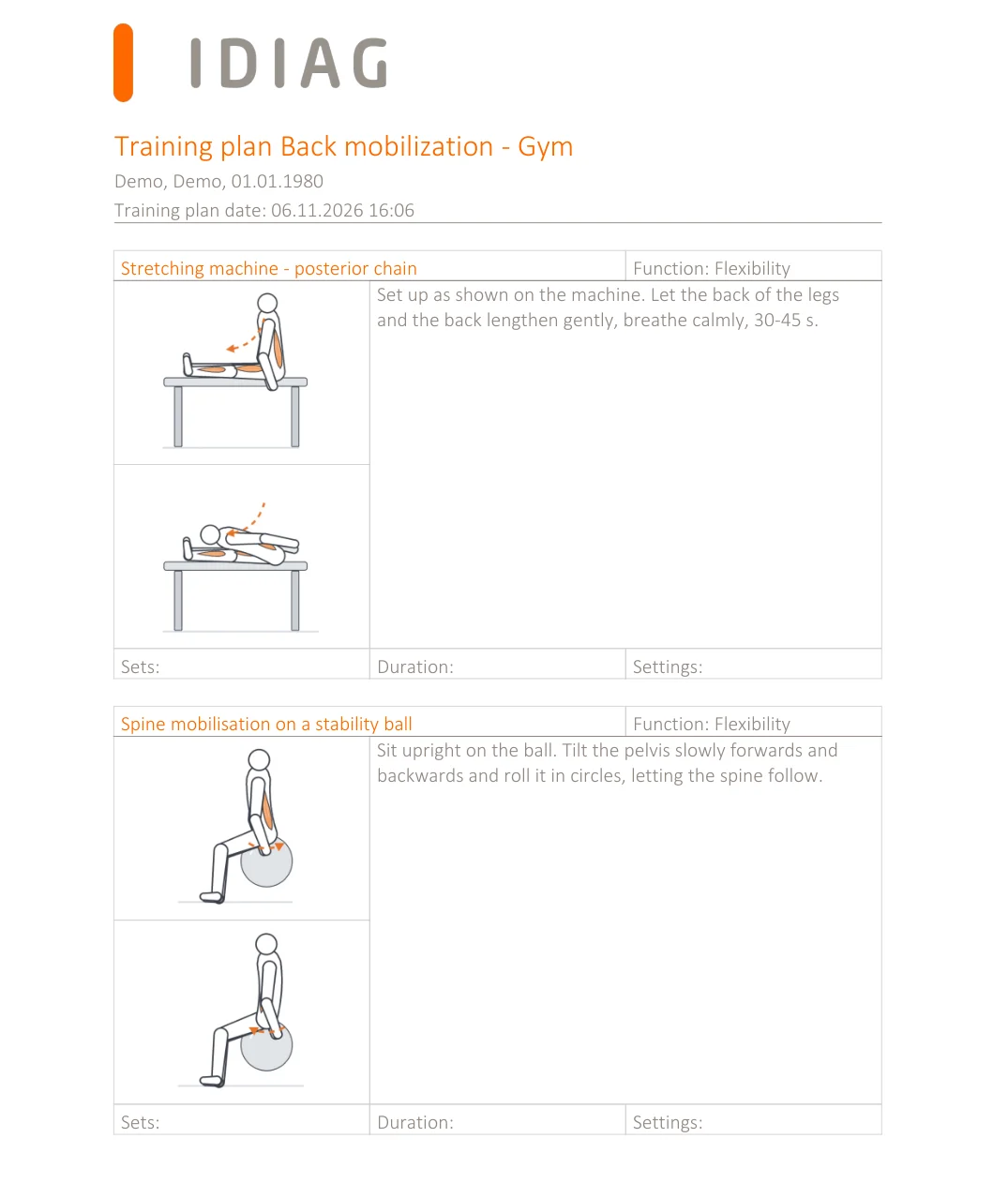
The training plan for the member
A clear plan to take home: every exercise with two illustrations, short instructions and fields for sets, duration and machine settings.
- With your logo, as PDF to print or by email.
- Exercises for the machines on your floor, so members train with what they see in the club.
- Together with the report of the check, as the basis for the re-check.
Shoulder test and re-check
Shoulder and arm test
Optional: mobility of the shoulders and arms, left against right.
Re-check
After 6 to 8 weeks the same check again: progress for every score, side by side.
Idiag Checkup is a fitness and wellness assessment, not a medical device. It does not detect or treat diseases; members with pain or a known condition should see a doctor.
One setup file, ready in minutes
After ordering you get the download link and the license key by email. One setup installs everything the software needs.
Everything in one setup
The Idiag software, the camera software for the Orbbec Astra 2 and the local database. No separate camera driver, no server.
Your Windows laptop
Windows 10 or 11, 8 GB RAM, Full HD screen and a free USB-C port (USB 3, 5 Gbit/s) for each camera.
Camera & setup in detailYour logo, your language
Add your logo once in the settings; it appears on every report and training plan. The software is available in 11 languages.
One license per workstation
$100 / €100 per workstation per year, all updates included.
- Enter the license key once; the software activates online.
- After that it also works without internet, for up to 30 days at a time.
- The license check sends no member data, only usage counters such as the number of checks.
- The license renews yearly and can be cancelled any time before renewal.
- More checks than one workstation can handle? Add a second license and a second laptop.
Stored on your workstation
Member data and checks are stored in a local database on your laptop, not in a cloud.
- You decide what is printed, emailed or exported.
- The camera records only the shape of the back, no photos.
- Updates and a reinstall keep your data.
- Back up the laptop regularly, as with any business data.
Always the current version
The software tells you when a new version is available. Updates are included in the license and install over the existing version.
Videos, documentation, support
Onboarding videos and documentation are included, as well as help with license activation and software errors by email. For more, there are Support & Education, Individual Support and 1:1 Training.
Support and training optionsSee it live
Watch the setup video, or choose how you want to start.